Table of Contents
Analytics settings #
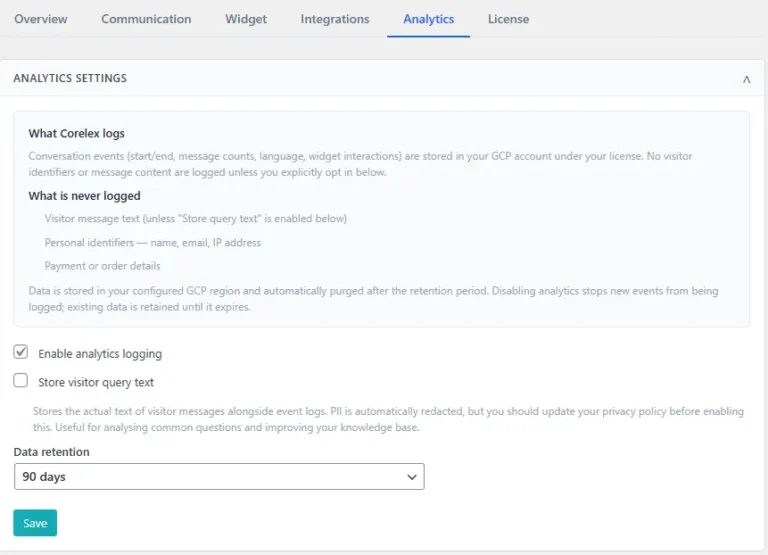
When website visitors use Corelex, then different actions get integrated with your standard Google Analytics 4 account. You may use your standard GA4 reporting, and use the ‘corelex-‘ prefix, to report on Corelex specific statistics.
- Select ‘Enable analytics logging‘ to enable the standard GA4 integration
- If you want more details about the actual questions that get asked during chat sessions, then switch on ‘Store visitor query text‘
Note: As also mentioned in the admin pages should take into account that PII information gets automatically redacted, and that these recordings should be indicated in the website’s privacy policy before enabling this functionality
Analytics dashboard #
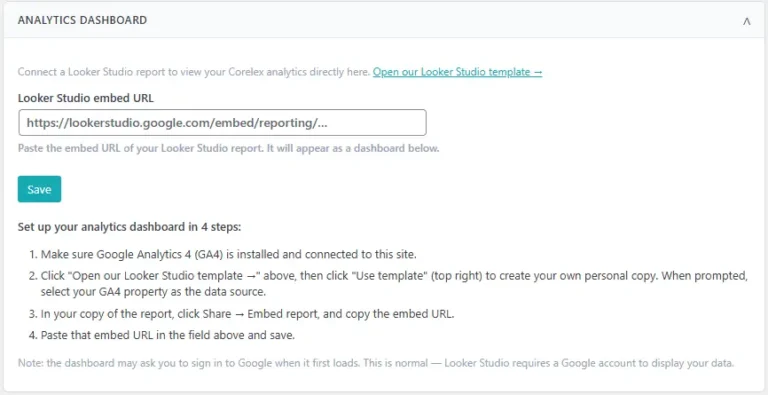
While it is very much possible to use the Corelex events in standard GA4 reporting, we have also included a template Looker report on GA4 data.
- Open our Looker Studio template
- Looker Studio opens, here click ‘Use template’ to create your own personal copy of our template
- Select your GA4 property as the data source
- In your copy of the report, click Share, then select Embed report and next copy the embed URL
- Paste the embed URL in the ‘Looker Studio embed URL’ field
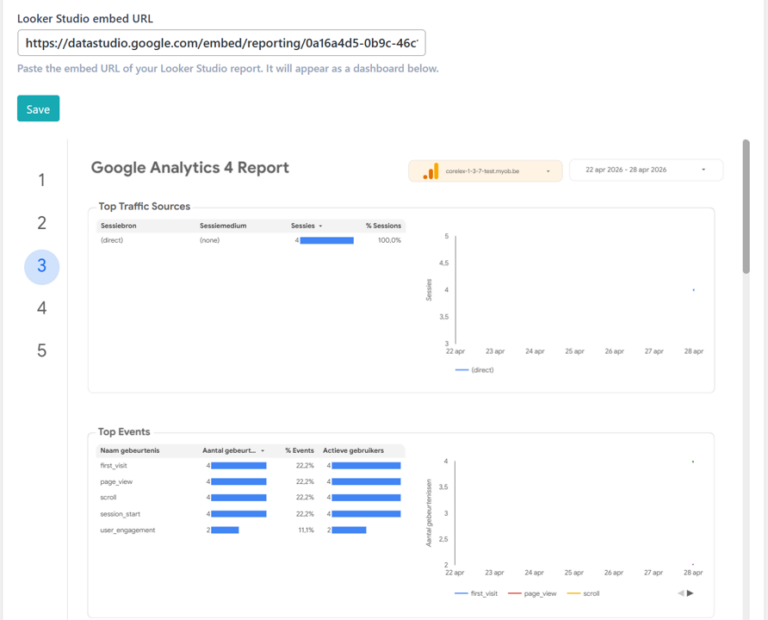
The result of the Looker Studio report integration looks as follows