
Corelex v1.4: What’s new in your WooCommerce AI agent
Every webshop gets the same questions, day after day. Where is my order? How do I return something? When will this arrive? They feel trivial — and that is exactly the problem. Research consistently shows that order status, delivery queries, and return questions make up 60 to 70% of all ecommerce support tickets. Your team fields hundreds of them every month, each one pulling time away from the work that actually grows the business.
The good news: these are also the questions best suited for automation. When self-service tools handle routine lookups effectively, stores report support ticket volumes dropping by 25 to 35%. And when AI handles the routine, agents spend their time on the cases where they genuinely add value — complex returns, complaints, and high-value customers who deserve real attention.
Corelex v1.4 is built around that split. This WooCommerce AI agent update focuses on one idea: your chat widget should handle the routine without being asked twice — and when a customer genuinely needs a human, that handoff should feel effortless.
Here is what is new.
Instant answers for your most common questions
The quick action buttons that greet visitors when they open the chat have been completely rethought. Each button now works independently, so you can configure them to match exactly how your store operates.
Check Order Status works the same as before: a visitor enters their order number and email address in a single step, and Corelex looks up the order directly in WooCommerce. No back-and-forth, no manual lookup on your end.
Start a Return now takes visitors through a verification step — order number and email — before automatically opening their WooCommerce order page in a new tab. From there they can manage the return themselves. The result: fewer support emails, and customers who feel in control.
Shipping & Delivery now offers two modes. If your store has shipment tracking per order, visitors can look up their specific shipment inline. If you prefer to route these questions through your knowledge base — pointing to your shipping policy, delivery zones, and FAQ content — you can do that instead.
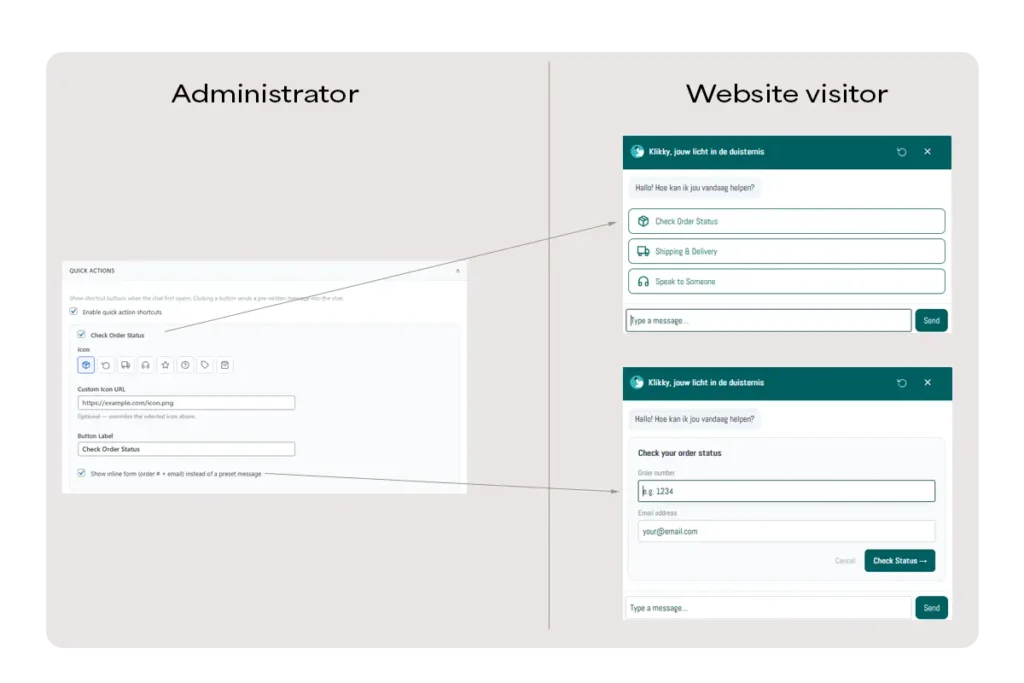
The net effect for webshop owners: a significant portion of inbound support volume is handled before it ever becomes a ticket.
Human handoff on your preferred channel — with context already included
When a customer needs to speak to a real person, the way that handoff happens matters a lot. An agent who has to re-read an entire conversation history before they can help creates friction for everyone.
Corelex v1.4 introduces a configurable contact channel for the Speak to Someone button:
- WhatsApp: Corelex generates a concise summary of the conversation — in the customer’s own language — and pre-fills it into a WhatsApp message. Your support team sees exactly what the customer needed, what was already tried, and where things stand. No re-introduction required.
- Email: An inline contact form appears in the chat, pre-filled with the conversation summary, and the message is sent directly to your configured email address.
The AI is also now channel-aware throughout the conversation. If a visitor types “I’d like to speak with someone” mid-chat, the response they see matches the channel you have set up. If you’ve configured email, Corelex mentions the email form — not WhatsApp.
This also means that when the AI hands off a frustrated customer to WhatsApp, the summary it generates is more complete and properly capped to avoid encoding issues.
Exit intent popup: one last chance before they leave
For desktop visitors who move their cursor toward the top of the browser — a reliable signal that they are about to close the tab — the chat widget now opens automatically.
You can configure a pre-fill message so the widget opens with a helpful prompt already in the conversation, turning a potential exit into an engagement moment. The popup fires only once per session and is automatically disabled on pages you have already excluded from the widget, such as the checkout page.
This is particularly useful for stores with longer consideration cycles, where a well-timed question — “Can I help you find the right product?” — can be the difference between a bounce and a sale.
More visibility for store owners: Google Analytics events
Understanding how visitors interact with your chat widget has always been useful. In v1.4, Corelex now fires additional events into Google Analytics, giving you a clearer picture of how customers engage with specific features — which quick action buttons are used most, when the exit intent popup fires, and where handoffs occur.
This data feeds directly into decisions about which buttons to show, what your pre-fill message should say, and whether your contact channel configuration is working as intended.
What this means for your WooCommerce store
Taken together, the changes in v1.4 reduce the two biggest friction points in webshop support:
- Routine questions — order status, delivery queries, return requests — are answered instantly and accurately, without any involvement from your team.
- Complex cases — frustrated customers, multi-step issues, edge cases — are handed off to your support team with full context already in hand, so first-response time drops and customers feel heard from the start.
Both improvements work within the same WordPress plugin you already have installed. No additional setup is required to use the new quick action modes; the exit intent popup and Google Analytics events are opt-in from the Corelex admin panel.
Try it on your store
Corelex is available from €49.95/month with no per-agent fees and no per-resolution costs. Plans are based on monthly query volume, so your cost scales with usage — not with how many people are on your support team.
Corelex is built on Google Cloud Platform — Vertex AI Search, Gemini Flash, and Cloud Run — with your choice of EU, US, or Global data residency. Installed as a WordPress plugin in minutes, with no GCP console access required.