

How AI chat agents actually work on WooCommerce
Most WooCommerce stores that add an AI chatbot get the same result: an assistant that sounds helpful but doesn’t actually know your products, your policies, or your stock levels. It hallucinates prices. It recommends out-of-stock items. It can’t add anything to the cart.
That’s not an AI problem. It’s an architecture problem.
Understanding how a well-built WooCommerce AI agent actually works makes it much easier to evaluate what you’re looking at when you compare tools. This post explains the architecture, and why, with the right solution, none of it needs to be your problem to manage.
Why most chatbots fail on WooCommerce
A generic AI model has no idea your store exists. It has no access to your product catalogue, your pricing, your stock, or your return policy. Left to its own devices, it will make things up rather than admit it doesn’t know.
The standard fix is to “connect” the AI to your store. But how that connection is implemented makes all the difference.
The weak implementation: scrape your website, dump the text into the AI’s context, and hope it answers correctly. This breaks the moment your product data changes, gives stale stock information, and produces confident-sounding answers that are simply wrong.
Some budget WooCommerce AI chatbots take a different shortcut: they ask you to bring your own OpenAI or Gemini API key, connect it to a basic plugin, and absorb the token costs yourself. The monthly subscription looks cheap, but the AI infrastructure costs land directly on the merchant, with no cap, no management, and no predictable pricing. You’re paying for a shell, not a service.
The robust implementation uses a structured pipeline: enrich the query first, retrieve from live data sources second, synthesise the response third. Only then does the AI generate an answer — and only from what it actually retrieved. All of that infrastructure runs as a managed service, with costs fully included in a flat monthly subscription.
The 3-step pipeline: what it is and why it matters
A well-architected WooCommerce AI agent processes every customer message through three distinct stages. Here’s how it works and what you don’t need to think about when it’s running.
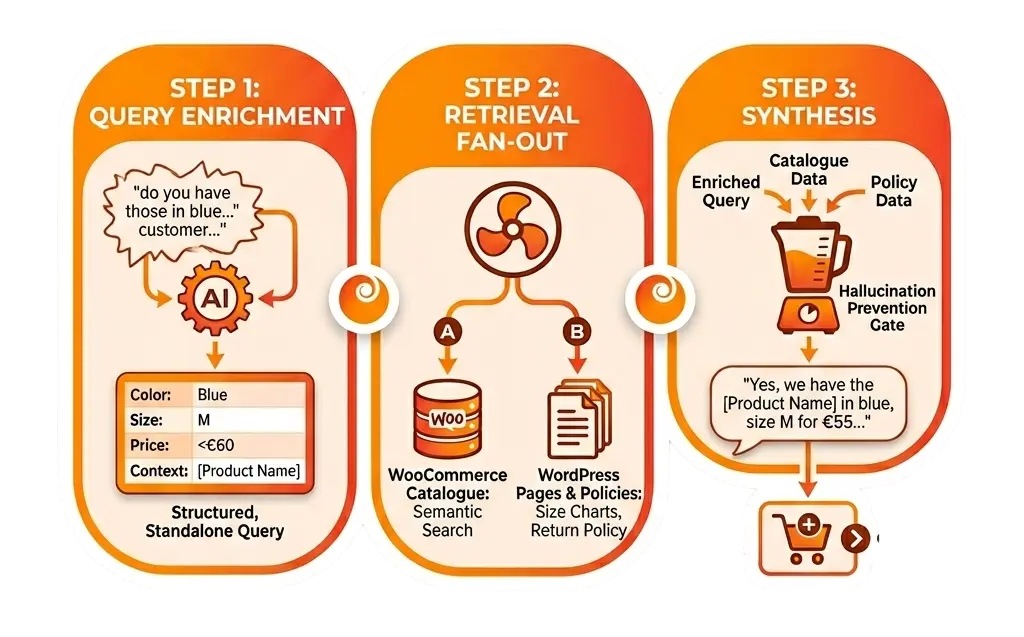
Step 1: Query enrichment
The customer’s message arrives along with the full conversation history. Before any retrieval happens, the AI runs a first pass to make sense of the message in context.
This step transforms a raw customer input – “do you have those in blue, size M, under €60?” – into a structured, standalone query that retrieval systems can actually work with. It strips pronouns, resolves references back through the conversation history (“those” becomes the product discussed two messages ago), and extracts entities: colour, size, price constraint.
Why does this matter? Because retrieval systems don’t understand conversational context. They need clean, explicit queries. The enrichment step bridges that gap, and it’s what allows an AI agent to hold a coherent multi-turn conversation rather than treating every message as isolated.
For merchants, this means the agent actually tracks what a customer is looking for across a full conversation: no repeated questions, no context loss, no frustrated customers.
Step 2: Retrieval fan-out
The enriched query goes out to the live data sources simultaneously. For a WooCommerce store, that typically means two systems running in parallel:
Product data: a semantic search index built from your WooCommerce catalogue. This isn’t keyword search. It understands that “trail shoes” and “hiking footwear” are the same thing, that “M” maps to the right WooCommerce attribute, and that only in-stock (or available-for-backorder) products should surface. In Corelex, this is powered by Vertex AI Search for commerce — the same infrastructure Google uses for retail search — which handles synonyms, SKUs, and ambiguity without any configuration from the merchant.
Knowledge base content: your WordPress pages, posts, and PDF documents. Return policies, shipping guides, size charts, care instructions. This is retrieved separately and merged before the synthesis step.
Both retrievals return ranked chunks of evidence. Nothing is invented. If the product doesn’t exist in your catalogue, the retrieval returns empty and that empty result is what gets passed forward.
Step 3: Synthesis
Now, and only now, does the AI generate a response. It receives: the conversation history, the customer’s original message, and the merged evidence chunks from step 2. It has no access to the open internet. It can’t reason beyond what was retrieved.
This is what prevents hallucination. The AI isn’t asked to “answer a question about running shoes.” It’s asked to “summarise these specific retrieved results for this specific customer query, in a helpful tone, in the customer’s language.” The constraint is the feature.
The output is a natural-language response grounded in your actual store data like accurate pricing, real stock levels, your actual policies, delivered conversationally.
If write actions are involved, like adding to cart, creating a support ticket, escalating to a human, an intent detection layer sits after synthesis, and a confirm gate fires before any action is taken. Nothing writes to your store without a deliberate trigger.
That’s the pipeline from the inside. If you’d like to see what it looks like from the customer’s side, from first visit to post-purchase, then see the full Corelex shopper journey →
What the merchant actually deals with: almost nothing
Here’s the part that doesn’t always get said clearly: as a WooCommerce merchant, you don’t configure any of this.
You install the plugin. You provision your Vertex AI Search datastore with one click from your WordPress admin by selecting your preferred data region (EU, US, or Global) in the process. The 3-step pipeline runs automatically from that point on.
The Gemini API calls that power query enrichment and synthesis, the Vertex AI Search infrastructure that handles retrieval, the token costs generated by every customer conversation… all of that is included in your flat monthly Corelex subscription. There’s no separate AI infrastructure to set up, no API keys to manage, no usage bills landing at the end of the month. The predictable query-based pricing means you always know what you’re paying, regardless of how many AI calls happen behind the scenes.
This is a meaningful distinction from cheaper alternatives in the market. Several budget WooCommerce AI chatbot plugins operate on a bring-your-own-key model: you supply your own OpenAI or Gemini API key, and every conversation draws from your personal API quota. The plugin subscription is low but the AI cost is unbounded and unmanaged. For a store with real traffic, that model quickly becomes expensive and unpredictable. Corelex absorbs the entire infrastructure cost and makes it part of a flat, predictable monthly plan.
The connector layer: where the real complexity lives
The 3-step pipeline is the reasoning layer. The connector layer is what makes it useful for WooCommerce specifically.
Connecting an AI pipeline to WooCommerce is not a one-line API call. Products have variants, stock thresholds, backorder rules, attribute taxonomies, and price tiers. The connector has to handle all of that, keep the search index in sync with live catalogue changes via webhooks and scheduled batch sync, and return results in a format the pipeline can use.
This is why the integration is the product, not the AI model. Gemini, GPT-4o, Claude, the underlying model is infrastructure, and increasingly a commodity. What differentiates a WooCommerce AI chatbot is the quality of the connector layer: how fresh the data is, how accurately it represents your catalogue, and what actions it can execute.
For agencies evaluating solutions on behalf of clients, this is the right question to ask: does the connector write back to WooCommerce, or only read from it? A read-only connector can answer questions. A read-write connector, one that can add to cart, create leads, trigger handoffs, is a conversational commerce plugin. The difference in commercial value is significant.
Corelex uses a connector registry architecture where every integration – WooCommerce, Salesforce, ServiceNow, custom ERP systems – implements the same standard interface. That means adding integrations extends the platform without rebuilding the core pipeline, and merchants benefit from new connectors as they ship.
Data residency: a consideration often overlooked
One aspect of architecture that rarely gets discussed: where does the data live?
Every retrieved chunk, every indexed product, every KB article is your store’s data, processed and stored in a search index somewhere. For EU merchants operating under GDPR, “somewhere” is a meaningful word. For enterprise buyers and agencies handling client projects across regions, it matters at procurement level, often before any other evaluation criterion.
A well-designed WooCommerce AI chatbot lets merchants choose their data region at setup – EU, US, or Global – without requiring GCP console access or custom infrastructure work. This isn’t a niche compliance feature. For agencies proposing AI tools to regulated clients, or for any merchant who has ever been asked “where is our customer data stored?”, data residency choice is a procurement-level differentiator.
Summary
A WooCommerce AI agent that works in production runs a structured pipeline: query enrichment to understand context, retrieval fan-out to fetch live data, and synthesis constrained to what was retrieved. It doesn’t generate answers from nothing, it assembles answers from your store.
The difference between an AI chatbot that hallucinates and one that doesn’t isn’t which model is underneath. It’s whether the architecture enforces retrieval before generation, whether the connector layer keeps that data accurate and current, and whether all of that infrastructure is managed for you, or handed back to you as a configuration problem.
For WooCommerce merchants: you get the pipeline, the retrieval infrastructure, the Gemini API calls, and the predictable pricing, all without touching any of it yourself.
For agencies: you get a technically defensible answer to “how does this actually work?”, and a platform built to extend as your clients’ needs grow.
Corelex is a managed AI sales and service agent for WooCommerce, built on Google Cloud Platform. See pricing → or explore the full feature set →.